> ## Documentation Index
> Fetch the complete documentation index at: https://docs.bayboard.io/llms.txt
> Use this file to discover all available pages before exploring further.
# Shop profile and hours
> Update shop details, Hours of Operation, and the pay period in Settings > General.
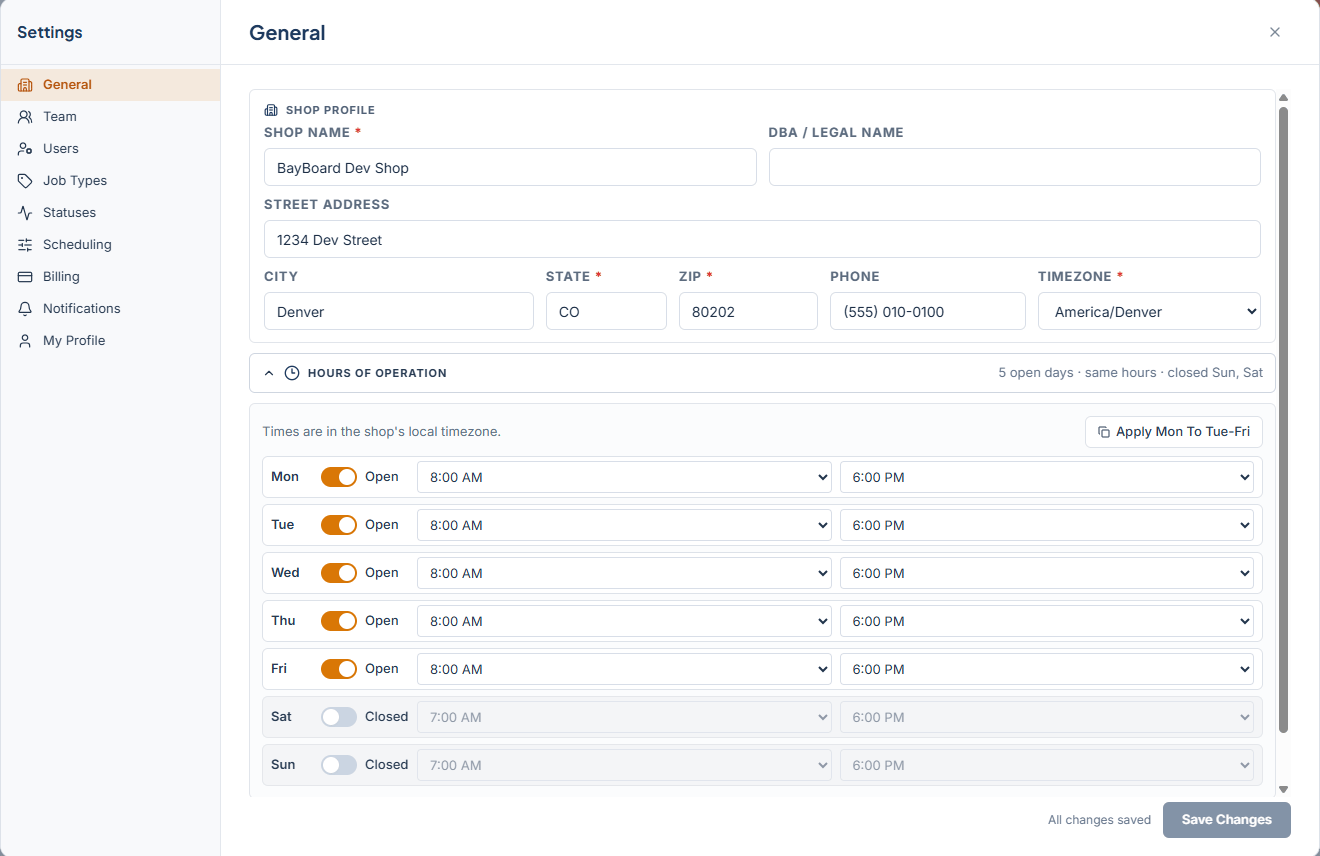
Settings > General holds your shop's profile, opening hours, and pay period. Only the Owner / Admin and General Manager see this section.
 ## Shop profile
| Field | Notes |
| -------------------- | ------------------------------------------------------------------------ |
| Shop Name | Required. |
| DBA / Legal Name | Optional. |
| Street Address, City | |
| State | Required. Two uppercase letters. |
| ZIP | Required. 12345 or 12345-6789. |
| Phone | |
| Timezone | Required. Pick from the list, or click **Show all timezones…** for more. |
## Hours of Operation
Open the Hours of Operation accordion. Times are in the shop's local timezone.
Each day from Monday to Sunday has an Open/Closed toggle and opening and closing times in 30-minute steps. Set Monday, then click **Apply Mon To Tue-Fri** to copy it across the work week. The summary line shows what you have set, for example "5 open days · same hours · closed Sat, Sun".
Shop hours shape the board. The grid runs from opening to closing time, and closed days are skipped when you move between days. A job cannot be dropped outside these hours.
## Pay Period Configuration
Open the Pay Period Configuration accordion. This is used for "Pay Period to Date" on the My hours report.
Choose a Frequency of Weekly, Biweekly, or Monthly. Then set Start Day, or Start Day of Month for a monthly period.
## Save your changes
The status line reads "Unsaved changes" while you edit and "All changes saved" once saved. Click **Save Changes**. You see "Changes saved." on success, or "Changes were not saved" with a **Retry** button.
If you close Settings with edits pending, BayBoard asks "Discard unsaved changes?". If you come back later and see "You have unsaved changes from earlier.", click **Restore** to pick up where you left off or **Discard** to start clean.
When billing is past due, every Settings section is read-only until payment is updated.
## Related
* [Set up your shop](/getting-started/set-up-your-shop)
* [My hours](/reports/my-hours)
* [Assign a job](/schedule-board/assign-a-job)
## Related topics
- [My hours](/reports/my-hours.md)
- [Set up your shop](/getting-started/set-up-your-shop.md)
- [Getting started](/getting-started.md)
- [Scoreboard](/reports/scoreboard.md)
- [My profile and password](/getting-started/my-profile.md)
## Shop profile
| Field | Notes |
| -------------------- | ------------------------------------------------------------------------ |
| Shop Name | Required. |
| DBA / Legal Name | Optional. |
| Street Address, City | |
| State | Required. Two uppercase letters. |
| ZIP | Required. 12345 or 12345-6789. |
| Phone | |
| Timezone | Required. Pick from the list, or click **Show all timezones…** for more. |
## Hours of Operation
Open the Hours of Operation accordion. Times are in the shop's local timezone.
Each day from Monday to Sunday has an Open/Closed toggle and opening and closing times in 30-minute steps. Set Monday, then click **Apply Mon To Tue-Fri** to copy it across the work week. The summary line shows what you have set, for example "5 open days · same hours · closed Sat, Sun".
Shop hours shape the board. The grid runs from opening to closing time, and closed days are skipped when you move between days. A job cannot be dropped outside these hours.
## Pay Period Configuration
Open the Pay Period Configuration accordion. This is used for "Pay Period to Date" on the My hours report.
Choose a Frequency of Weekly, Biweekly, or Monthly. Then set Start Day, or Start Day of Month for a monthly period.
## Save your changes
The status line reads "Unsaved changes" while you edit and "All changes saved" once saved. Click **Save Changes**. You see "Changes saved." on success, or "Changes were not saved" with a **Retry** button.
If you close Settings with edits pending, BayBoard asks "Discard unsaved changes?". If you come back later and see "You have unsaved changes from earlier.", click **Restore** to pick up where you left off or **Discard** to start clean.
When billing is past due, every Settings section is read-only until payment is updated.
## Related
* [Set up your shop](/getting-started/set-up-your-shop)
* [My hours](/reports/my-hours)
* [Assign a job](/schedule-board/assign-a-job)
## Related topics
- [My hours](/reports/my-hours.md)
- [Set up your shop](/getting-started/set-up-your-shop.md)
- [Getting started](/getting-started.md)
- [Scoreboard](/reports/scoreboard.md)
- [My profile and password](/getting-started/my-profile.md)