> ## Documentation Index
> Fetch the complete documentation index at: https://docs.bayboard.io/llms.txt
> Use this file to discover all available pages before exploring further.
# Reports
> See the shop's numbers in three lenses, Today, Scoreboard, and My hours.
Reports lives in the left rail. Press G then R to jump there from anywhere. The page has three lenses, shown as tabs at the top.
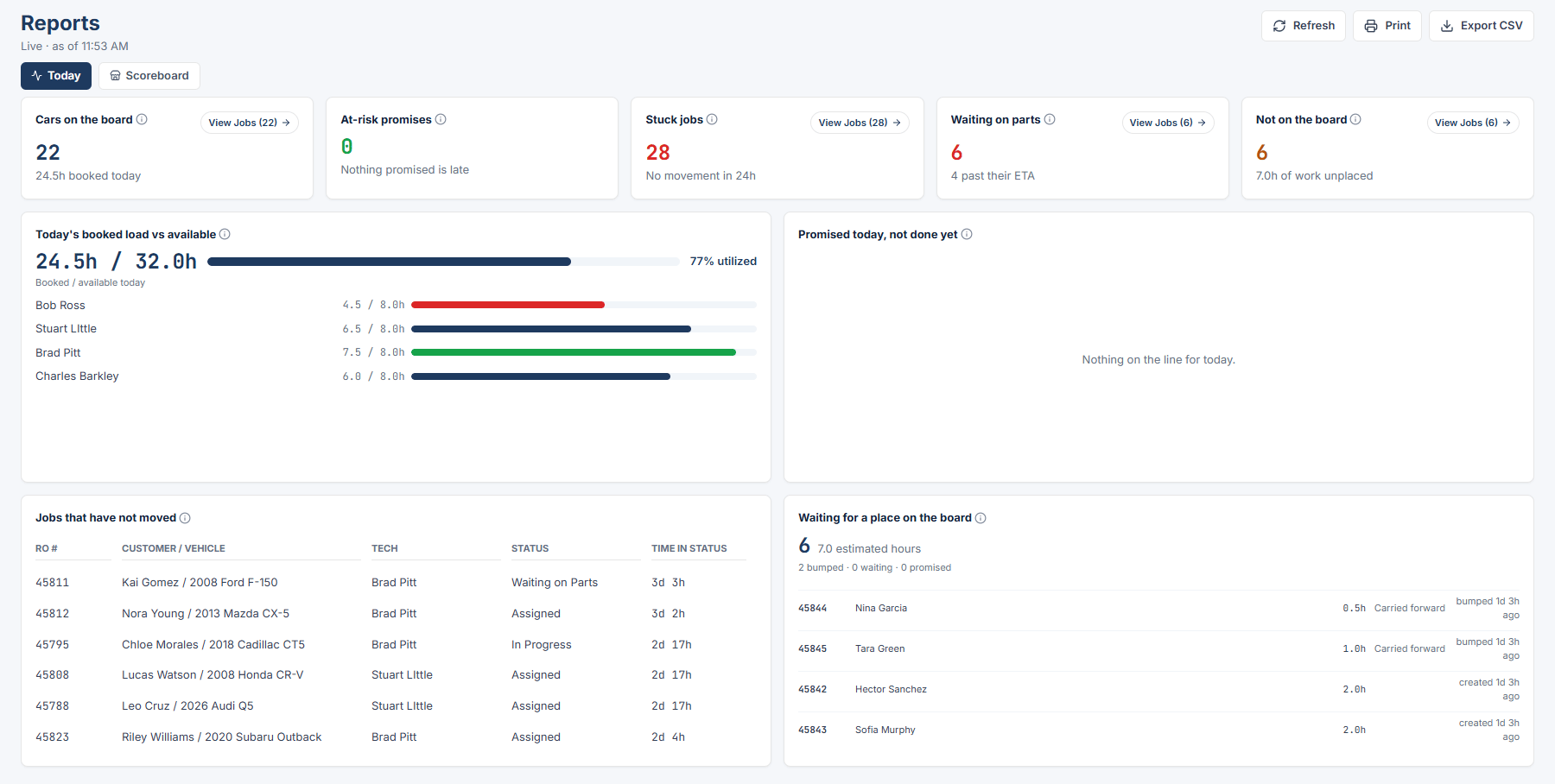
* **Today** is a live view of the board right now: what is on it, what is at risk, and what is stuck.
* **Scoreboard** shows delivered hours, cars finished, and capacity over a date range, compared with the prior period.
* **My hours** shows one technician's own hours, pay period, and on-time rate.
 ## Who sees which lens
| Role | Today | Scoreboard | My hours |
| --------------- | ----- | ---------- | -------- |
| Owner / Admin | Yes | Yes | No |
| General Manager | Yes | Yes | No |
| Service Advisor | Yes | Yes | No |
| Foreman | Yes | Yes | Yes |
| Technician | No | No | Yes |
Opening Reports lands on Today. Technicians land on My hours.
## Pick a range
Today has no range picker. It shows "Live · as of \[time]" with a **Refresh** button, and it refreshes again when you return to the tab.
Scoreboard and My hours have a "Report range" select with these options: Today, This pay period, This week, Last week, This month, Last month, Year to date, Custom. Custom adds "Custom range start" and "Custom range end" date inputs. A custom range can cover at most 366 days.
## Open the jobs behind a number
Every tile has a **View Jobs (n)** button. Bars and donut segments are clickable too. Each one opens a drill panel on the right that lists the jobs in that slice. Click an RO # in the list to open that job's Job Details. Press Esc to close the panel.
## Export and print
Owner / Admin sees **Export CSV** and **Print** in the Reports header on Today and Scoreboard. See [Export and print](/reports/export-and-print).
## If the report cannot load
You see "Reports could not load. Check your connection and reload." with a **Reload** button.
Cars on the board, at-risk promises, stuck jobs, parts holds, and what is not placed.
Hours delivered, cars finished, capacity used, and on-time promises over a range.
Your own hours by week, pay period, and month.
Download a CSV or print a report as an Owner / Admin.
## Related topics
- [Scoreboard](/reports/scoreboard.md)
- [Export and print](/reports/export-and-print.md)
- [Users and access](/users-and-access.md)
- [My hours](/reports/my-hours.md)
- [Today](/reports/today.md)
## Who sees which lens
| Role | Today | Scoreboard | My hours |
| --------------- | ----- | ---------- | -------- |
| Owner / Admin | Yes | Yes | No |
| General Manager | Yes | Yes | No |
| Service Advisor | Yes | Yes | No |
| Foreman | Yes | Yes | Yes |
| Technician | No | No | Yes |
Opening Reports lands on Today. Technicians land on My hours.
## Pick a range
Today has no range picker. It shows "Live · as of \[time]" with a **Refresh** button, and it refreshes again when you return to the tab.
Scoreboard and My hours have a "Report range" select with these options: Today, This pay period, This week, Last week, This month, Last month, Year to date, Custom. Custom adds "Custom range start" and "Custom range end" date inputs. A custom range can cover at most 366 days.
## Open the jobs behind a number
Every tile has a **View Jobs (n)** button. Bars and donut segments are clickable too. Each one opens a drill panel on the right that lists the jobs in that slice. Click an RO # in the list to open that job's Job Details. Press Esc to close the panel.
## Export and print
Owner / Admin sees **Export CSV** and **Print** in the Reports header on Today and Scoreboard. See [Export and print](/reports/export-and-print).
## If the report cannot load
You see "Reports could not load. Check your connection and reload." with a **Reload** button.
Cars on the board, at-risk promises, stuck jobs, parts holds, and what is not placed.
Hours delivered, cars finished, capacity used, and on-time promises over a range.
Your own hours by week, pay period, and month.
Download a CSV or print a report as an Owner / Admin.
## Related topics
- [Scoreboard](/reports/scoreboard.md)
- [Export and print](/reports/export-and-print.md)
- [Users and access](/users-and-access.md)
- [My hours](/reports/my-hours.md)
- [Today](/reports/today.md)