> ## Documentation Index
> Fetch the complete documentation index at: https://docs.bayboard.io/llms.txt
> Use this file to discover all available pages before exploring further.
# Search
> Find a job on any day by RO number, customer, vehicle, job type, or VIN.
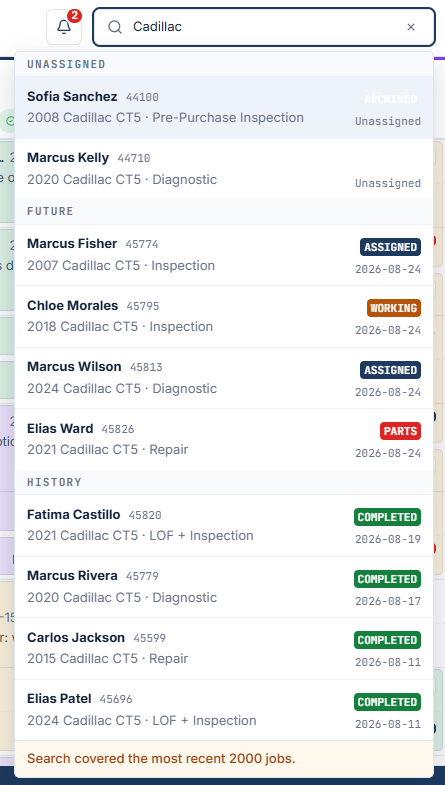
Search lives in the top bar. Click it, or press Ctrl+K on Windows, Cmd+K on Mac. The field reads "Search jobs, customers, vehicles, VIN...". Every role can search.
 ## What it searches
* RO number
* Customer name
* Vehicle year, make, or model
* Job type
* VIN, once you type three or more characters
It does not search descriptions, key tags, or phone numbers.
## Results
Up to 10 results show, grouped as Today, Unassigned, Future, and History. Select a result to open that job's details on the day it is scheduled.
## Keyboard
* Arrow keys move through the results.
* Enter opens the selected job.
* Esc closes search. Press Esc again to clear the text.
Search covers the most recent 2000 jobs. When that limit applies, the results end with "Search covered the most recent 2000 jobs." Older jobs will not appear.
## Related
* [Job details](/schedule-board/job-details)
* [Keyboard shortcuts](/support/keyboard-shortcuts)
## Related topics
- [Find your way around](/getting-started/find-your-way-around.md)
- [Keyboard shortcuts](/support/keyboard-shortcuts.md)
- [Add a job](/schedule-board/add-a-job.md)
- [Schedule board](/schedule-board.md)
- [Users and access](/users-and-access.md)
## What it searches
* RO number
* Customer name
* Vehicle year, make, or model
* Job type
* VIN, once you type three or more characters
It does not search descriptions, key tags, or phone numbers.
## Results
Up to 10 results show, grouped as Today, Unassigned, Future, and History. Select a result to open that job's details on the day it is scheduled.
## Keyboard
* Arrow keys move through the results.
* Enter opens the selected job.
* Esc closes search. Press Esc again to clear the text.
Search covers the most recent 2000 jobs. When that limit applies, the results end with "Search covered the most recent 2000 jobs." Older jobs will not appear.
## Related
* [Job details](/schedule-board/job-details)
* [Keyboard shortcuts](/support/keyboard-shortcuts)
## Related topics
- [Find your way around](/getting-started/find-your-way-around.md)
- [Keyboard shortcuts](/support/keyboard-shortcuts.md)
- [Add a job](/schedule-board/add-a-job.md)
- [Schedule board](/schedule-board.md)
- [Users and access](/users-and-access.md)