> ## Documentation Index
> Fetch the complete documentation index at: https://docs.bayboard.io/llms.txt
> Use this file to discover all available pages before exploring further.
# System status
> Check whether BayBoard services are up before you report a problem.
The System Status screen shows the live operational status of BayBoard services. It pulls from the public status page at status.bayboard.io.
## Open System Status
Click **Support** in the left rail, then **System Status**.
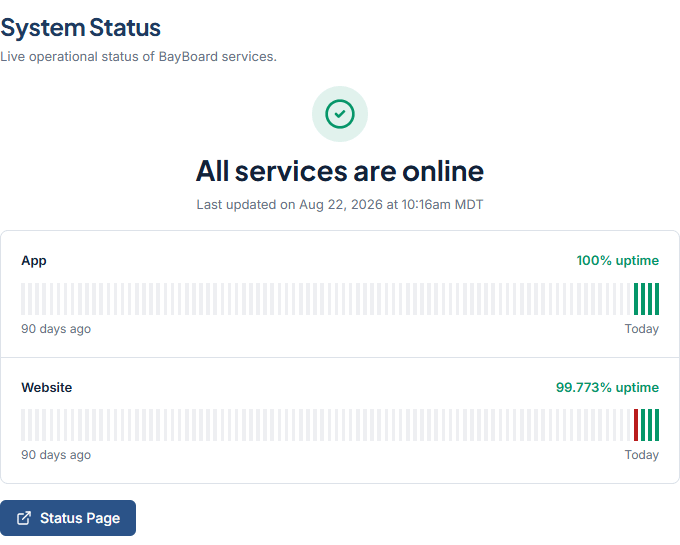 ## What the screen shows
The headline at the top is one of four states:
* All services are online
* Some systems are experiencing issues
* Some systems are down
* Some systems are under maintenance
Under the headline, "Last updated on \[date] at \[time]" tells you how fresh the information is.
Each service has its own row with the service name, its uptime as "NN% uptime", and a 90-day bar that runs from "90 days ago" to "Today". Bar colors mean:
| Color | Meaning |
| ----- | ----------------------- |
| Green | Operational |
| Amber | Degraded or maintenance |
| Red | Downtime |
Click **Status Page** to open status.bayboard.io in a new tab.
## If the status cannot load
The screen shows "Can't load status" and "Open the public status page for the current state. This screen never assumes BayBoard is operational."
This screen never guesses that BayBoard is up. Click **Status Page** to check status.bayboard.io directly.
## If the board is down
If the headline says systems are down or under maintenance, the BayBoard team already knows. Watch the status page for updates.
If all services show online but your board still will not load, send a ticket from [Contact Support](/support/contact-support). Set Priority to Urgent (board down).
## Related
* [Contact Support](/support/contact-support)
## Related topics
- [Contact Support](/support/contact-support.md)
- [Find your way around](/getting-started/find-your-way-around.md)
- [BayBoard help](/index.md)
- [Job statuses](/schedule-board/job-statuses.md)
- [Run Auto-Schedule](/auto-scheduler/run-auto-schedule.md)
## What the screen shows
The headline at the top is one of four states:
* All services are online
* Some systems are experiencing issues
* Some systems are down
* Some systems are under maintenance
Under the headline, "Last updated on \[date] at \[time]" tells you how fresh the information is.
Each service has its own row with the service name, its uptime as "NN% uptime", and a 90-day bar that runs from "90 days ago" to "Today". Bar colors mean:
| Color | Meaning |
| ----- | ----------------------- |
| Green | Operational |
| Amber | Degraded or maintenance |
| Red | Downtime |
Click **Status Page** to open status.bayboard.io in a new tab.
## If the status cannot load
The screen shows "Can't load status" and "Open the public status page for the current state. This screen never assumes BayBoard is operational."
This screen never guesses that BayBoard is up. Click **Status Page** to check status.bayboard.io directly.
## If the board is down
If the headline says systems are down or under maintenance, the BayBoard team already knows. Watch the status page for updates.
If all services show online but your board still will not load, send a ticket from [Contact Support](/support/contact-support). Set Priority to Urgent (board down).
## Related
* [Contact Support](/support/contact-support)
## Related topics
- [Contact Support](/support/contact-support.md)
- [Find your way around](/getting-started/find-your-way-around.md)
- [BayBoard help](/index.md)
- [Job statuses](/schedule-board/job-statuses.md)
- [Run Auto-Schedule](/auto-scheduler/run-auto-schedule.md)