> ## Documentation Index
> Fetch the complete documentation index at: https://docs.bayboard.io/llms.txt
> Use this file to discover all available pages before exploring further.
# Add a technician
> Create a roster record so a technician gets a column on the schedule board.
A roster technician is a column on the board. Add one in Settings > Team. Only Owner / Admin and General Manager can do this.
Adding a technician does not give that person sign-in access. To let them sign in, [invite a user](/users-and-access/invite-a-user) and link the account to this roster record.
 ## Add the technician
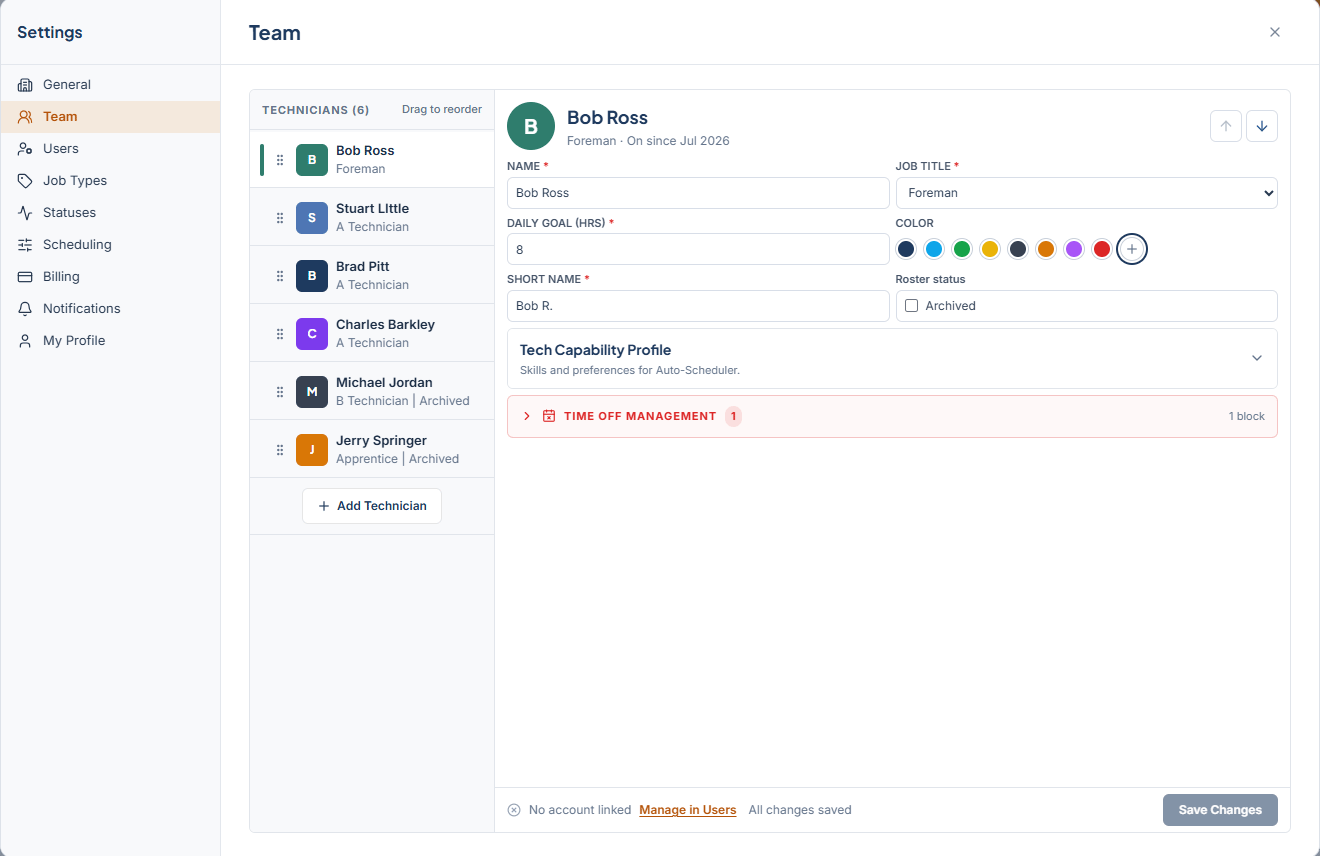
Open Settings from the left rail and pick **Team**. The left side lists TECHNICIANS with a count. If the roster is empty you see "No roster technicians" and "Add a roster record to create a schedule column."
Click **Add Technician**. The detail panel shows "Fill in details to add".
| Field | What to enter |
| ---------------- | -------------------------------------------------------------------------------------------------- |
| NAME | The technician's full name. Required. |
| JOB TITLE | Foreman, A Technician, B Technician, or Apprentice. Required. |
| DAILY GOAL (HRS) | Target hours per day, 0.5 to 24 in half-hour steps. Required. Shown in the Shop Performance strip. |
| COLOR | Pick one of the eight swatches or choose Custom color. |
| SHORT NAME | The label shown at the top of the column. Required. |
Click **Save Changes**. The technician appears in the list and gets a column on the board.
## Reorder the roster
Board columns follow the order of the roster list. Drag a technician to a new spot, or use **Move Up** and **Move Down** next to their name. The list pages with **Previous** and **Next** when it gets long.
## What other roles see
Service Advisor and Foreman can open the Team tab but cannot change it. They see "View only. The tech roster is managed by the Owner or GM. Need to log time off for someone? Use the Time Off tab."
If you leave the tab with unsaved edits, BayBoard asks "Discard unsaved changes?" Choose **Keep Editing** to go back or **Discard Changes** to drop them.
## Related
* [Tech capability profile](/team-and-roles/tech-capability-profile)
* [Archive or restore a technician](/team-and-roles/archive-a-technician)
* [Invite a user](/users-and-access/invite-a-user)
## Related topics
- [Archive or restore a technician](/team-and-roles/archive-a-technician.md)
- [Getting started](/getting-started.md)
- [Scoreboard](/reports/scoreboard.md)
- [Tech capability profile](/team-and-roles/tech-capability-profile.md)
- [Set up your shop](/getting-started/set-up-your-shop.md)
## Add the technician
Open Settings from the left rail and pick **Team**. The left side lists TECHNICIANS with a count. If the roster is empty you see "No roster technicians" and "Add a roster record to create a schedule column."
Click **Add Technician**. The detail panel shows "Fill in details to add".
| Field | What to enter |
| ---------------- | -------------------------------------------------------------------------------------------------- |
| NAME | The technician's full name. Required. |
| JOB TITLE | Foreman, A Technician, B Technician, or Apprentice. Required. |
| DAILY GOAL (HRS) | Target hours per day, 0.5 to 24 in half-hour steps. Required. Shown in the Shop Performance strip. |
| COLOR | Pick one of the eight swatches or choose Custom color. |
| SHORT NAME | The label shown at the top of the column. Required. |
Click **Save Changes**. The technician appears in the list and gets a column on the board.
## Reorder the roster
Board columns follow the order of the roster list. Drag a technician to a new spot, or use **Move Up** and **Move Down** next to their name. The list pages with **Previous** and **Next** when it gets long.
## What other roles see
Service Advisor and Foreman can open the Team tab but cannot change it. They see "View only. The tech roster is managed by the Owner or GM. Need to log time off for someone? Use the Time Off tab."
If you leave the tab with unsaved edits, BayBoard asks "Discard unsaved changes?" Choose **Keep Editing** to go back or **Discard Changes** to drop them.
## Related
* [Tech capability profile](/team-and-roles/tech-capability-profile)
* [Archive or restore a technician](/team-and-roles/archive-a-technician)
* [Invite a user](/users-and-access/invite-a-user)
## Related topics
- [Archive or restore a technician](/team-and-roles/archive-a-technician.md)
- [Getting started](/getting-started.md)
- [Scoreboard](/reports/scoreboard.md)
- [Tech capability profile](/team-and-roles/tech-capability-profile.md)
- [Set up your shop](/getting-started/set-up-your-shop.md)