> ## Documentation Index
> Fetch the complete documentation index at: https://docs.bayboard.io/llms.txt
> Use this file to discover all available pages before exploring further.
# Tech capability profile
> Tell Auto-Schedule what each technician does best.
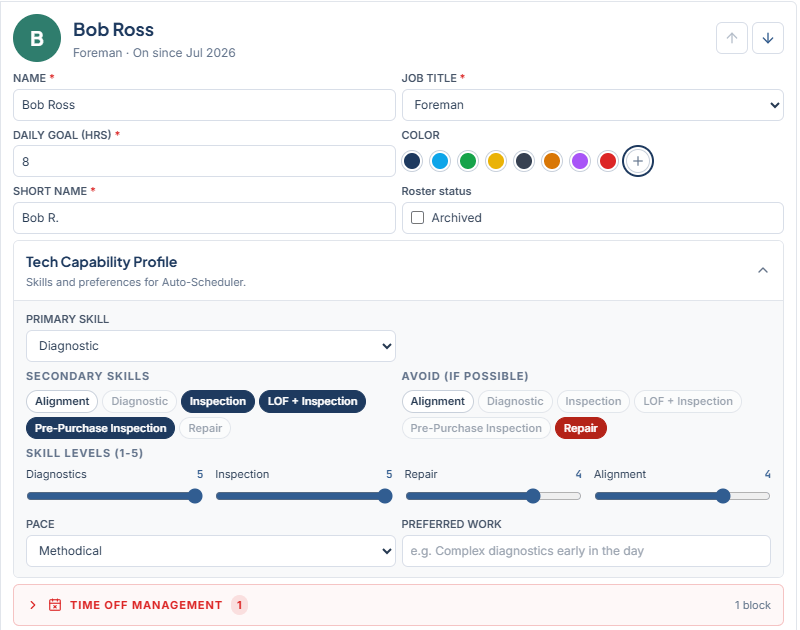
The Tech Capability Profile is a panel on each technician in Settings > Team. Its subtitle reads "Skills and preferences for Auto-Scheduler." Auto-Schedule reads it when it decides which technician gets a job.
 ## Fields
| Field | What it means |
| ------------------- | ----------------------------------------------------------------- |
| PRIMARY SKILL | The job type this technician does best. One of the six job types. |
| SECONDARY SKILLS | Other job types they can take. |
| AVOID (IF POSSIBLE) | Job types to keep away from this technician. |
| SKILL LEVELS (1-5) | Sliders for Diagnostics, Inspection, Repair, and Alignment. |
| PACE | How fast this technician works through jobs. |
| PREFERRED WORK | Free text, for example "Complex diagnostics early in the day". |
Click **Save Changes** after editing.
## How Auto-Schedule uses the profile
Auto-Schedule checks hard constraints first, then weighs soft preferences in the order set in Settings > Scheduling.
* **Skill match** is a hard constraint. When it is on, a technician's avoid list excludes them from that job type. The only exception is a job tagged "For" that technician in the Unassigned panel.
* **Best-qualified tech** is a soft preference. It favors the technician whose primary skill, secondary skills, and skill levels fit the job.
* **Match pace to job** is a soft preference. It uses the PACE setting to pair jobs with technicians.
Turn these on, off, or reorder them in [Scheduling preferences](/auto-scheduler/scheduling-preferences).
## Who can see or edit it
| Role | Access |
| --------------- | ------------------------- |
| Owner / Admin | Edit |
| General Manager | Edit |
| Foreman | View only |
| Service Advisor | Hidden |
| Technician | No access to the Team tab |
## Related
* [Add a technician](/team-and-roles/add-a-technician)
* [Scheduling preferences](/auto-scheduler/scheduling-preferences)
* [Run Auto-Schedule](/auto-scheduler/run-auto-schedule)
## Related topics
- [Add a technician](/team-and-roles/add-a-technician.md)
- [Scheduling preferences](/auto-scheduler/scheduling-preferences.md)
- [Auto-Scheduler](/auto-scheduler.md)
- [Run Auto-Schedule](/auto-scheduler/run-auto-schedule.md)
- [BayBoard help](/index.md)
## Fields
| Field | What it means |
| ------------------- | ----------------------------------------------------------------- |
| PRIMARY SKILL | The job type this technician does best. One of the six job types. |
| SECONDARY SKILLS | Other job types they can take. |
| AVOID (IF POSSIBLE) | Job types to keep away from this technician. |
| SKILL LEVELS (1-5) | Sliders for Diagnostics, Inspection, Repair, and Alignment. |
| PACE | How fast this technician works through jobs. |
| PREFERRED WORK | Free text, for example "Complex diagnostics early in the day". |
Click **Save Changes** after editing.
## How Auto-Schedule uses the profile
Auto-Schedule checks hard constraints first, then weighs soft preferences in the order set in Settings > Scheduling.
* **Skill match** is a hard constraint. When it is on, a technician's avoid list excludes them from that job type. The only exception is a job tagged "For" that technician in the Unassigned panel.
* **Best-qualified tech** is a soft preference. It favors the technician whose primary skill, secondary skills, and skill levels fit the job.
* **Match pace to job** is a soft preference. It uses the PACE setting to pair jobs with technicians.
Turn these on, off, or reorder them in [Scheduling preferences](/auto-scheduler/scheduling-preferences).
## Who can see or edit it
| Role | Access |
| --------------- | ------------------------- |
| Owner / Admin | Edit |
| General Manager | Edit |
| Foreman | View only |
| Service Advisor | Hidden |
| Technician | No access to the Team tab |
## Related
* [Add a technician](/team-and-roles/add-a-technician)
* [Scheduling preferences](/auto-scheduler/scheduling-preferences)
* [Run Auto-Schedule](/auto-scheduler/run-auto-schedule)
## Related topics
- [Add a technician](/team-and-roles/add-a-technician.md)
- [Scheduling preferences](/auto-scheduler/scheduling-preferences.md)
- [Auto-Scheduler](/auto-scheduler.md)
- [Run Auto-Schedule](/auto-scheduler/run-auto-schedule.md)
- [BayBoard help](/index.md)