> ## Documentation Index
> Fetch the complete documentation index at: https://docs.bayboard.io/llms.txt
> Use this file to discover all available pages before exploring further.
# Add time off
> Block a technician out for a day, part of a day, or a date range.
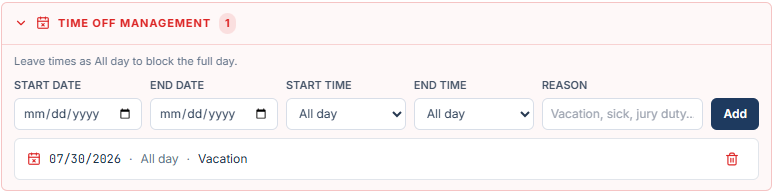
Owner / Admin, General Manager, Service Advisor, and Foreman can add time off. The form is the same Time Off Management panel wherever you open it.
 ## Add a block
Service Advisor and Foreman: open Settings and pick **Time Off**. Owner / Admin and General Manager: open Settings, pick **Team**, and click the technician. The panel intro reads "Block a tech out for a full day or part of a day."
On the Time Off tab, pick the person in the TECHNICIAN list on the left. Archived technicians are not listed. In Team, you already picked them.
| Field | What to enter |
| ---------- | ----------------------------------------------------------------- |
| START DATE | First day of the block. |
| END DATE | Last day of the block. Same as start for a single day. |
| START TIME | All day, or a 30-minute slot within shop hours. |
| END TIME | All day, or a 30-minute slot within shop hours. |
| REASON | Up to 100 characters, for example "Vacation, sick, jury duty...". |
Click **Add**. The block appears in the list under the form.
## All day or part of a day
Leave START TIME and END TIME as All day to block the full day. The hint reads "Leave times as All day to block the full day." Pick a start and end time to block only part of the day, for example a morning appointment.
A block can cover up to 31 calendar days. For a longer absence, add more than one block.
## Validation messages
| Message | Fix |
| ----------------------------------------------- | ---------------------------------------------- |
| Choose a start date. | Pick a START DATE. |
| Enter a reason for the time off. | Fill in REASON. |
| End time must be after start time. | Move END TIME later than START TIME. |
| End date cannot be before start date. | Move END DATE to the start date or later. |
| Time off ranges cannot exceed 31 calendar days. | Shorten the range or split it into two blocks. |
## After you save
A toast shows "Time off saved" with "\[shortName] marked off". If jobs were already on the board inside the block, it reads "\[shortName] marked off, \[n] job(s) moved to Unassigned". Those jobs land in the Unassigned panel with a red banner so you can reschedule them.
The block shows in the list as the date, All day or the time range, and the reason. On the board, the column gets a hatched overlay with OFF for a full day or PARTIAL for part of a day, plus the reason.
## Related
* [Delete time off](/time-off/delete-time-off)
* [Unassigned jobs](/schedule-board/unassigned-jobs)
* [Run Auto-Schedule](/auto-scheduler/run-auto-schedule)
## Related topics
- [Time off](/time-off.md)
- [Delete time off](/time-off/delete-time-off.md)
- [Scheduling preferences](/auto-scheduler/scheduling-preferences.md)
- [Users and access](/users-and-access.md)
- [Add a technician](/team-and-roles/add-a-technician.md)
## Add a block
Service Advisor and Foreman: open Settings and pick **Time Off**. Owner / Admin and General Manager: open Settings, pick **Team**, and click the technician. The panel intro reads "Block a tech out for a full day or part of a day."
On the Time Off tab, pick the person in the TECHNICIAN list on the left. Archived technicians are not listed. In Team, you already picked them.
| Field | What to enter |
| ---------- | ----------------------------------------------------------------- |
| START DATE | First day of the block. |
| END DATE | Last day of the block. Same as start for a single day. |
| START TIME | All day, or a 30-minute slot within shop hours. |
| END TIME | All day, or a 30-minute slot within shop hours. |
| REASON | Up to 100 characters, for example "Vacation, sick, jury duty...". |
Click **Add**. The block appears in the list under the form.
## All day or part of a day
Leave START TIME and END TIME as All day to block the full day. The hint reads "Leave times as All day to block the full day." Pick a start and end time to block only part of the day, for example a morning appointment.
A block can cover up to 31 calendar days. For a longer absence, add more than one block.
## Validation messages
| Message | Fix |
| ----------------------------------------------- | ---------------------------------------------- |
| Choose a start date. | Pick a START DATE. |
| Enter a reason for the time off. | Fill in REASON. |
| End time must be after start time. | Move END TIME later than START TIME. |
| End date cannot be before start date. | Move END DATE to the start date or later. |
| Time off ranges cannot exceed 31 calendar days. | Shorten the range or split it into two blocks. |
## After you save
A toast shows "Time off saved" with "\[shortName] marked off". If jobs were already on the board inside the block, it reads "\[shortName] marked off, \[n] job(s) moved to Unassigned". Those jobs land in the Unassigned panel with a red banner so you can reschedule them.
The block shows in the list as the date, All day or the time range, and the reason. On the board, the column gets a hatched overlay with OFF for a full day or PARTIAL for part of a day, plus the reason.
## Related
* [Delete time off](/time-off/delete-time-off)
* [Unassigned jobs](/schedule-board/unassigned-jobs)
* [Run Auto-Schedule](/auto-scheduler/run-auto-schedule)
## Related topics
- [Time off](/time-off.md)
- [Delete time off](/time-off/delete-time-off.md)
- [Scheduling preferences](/auto-scheduler/scheduling-preferences.md)
- [Users and access](/users-and-access.md)
- [Add a technician](/team-and-roles/add-a-technician.md)