
Steps
1
Open the drawer
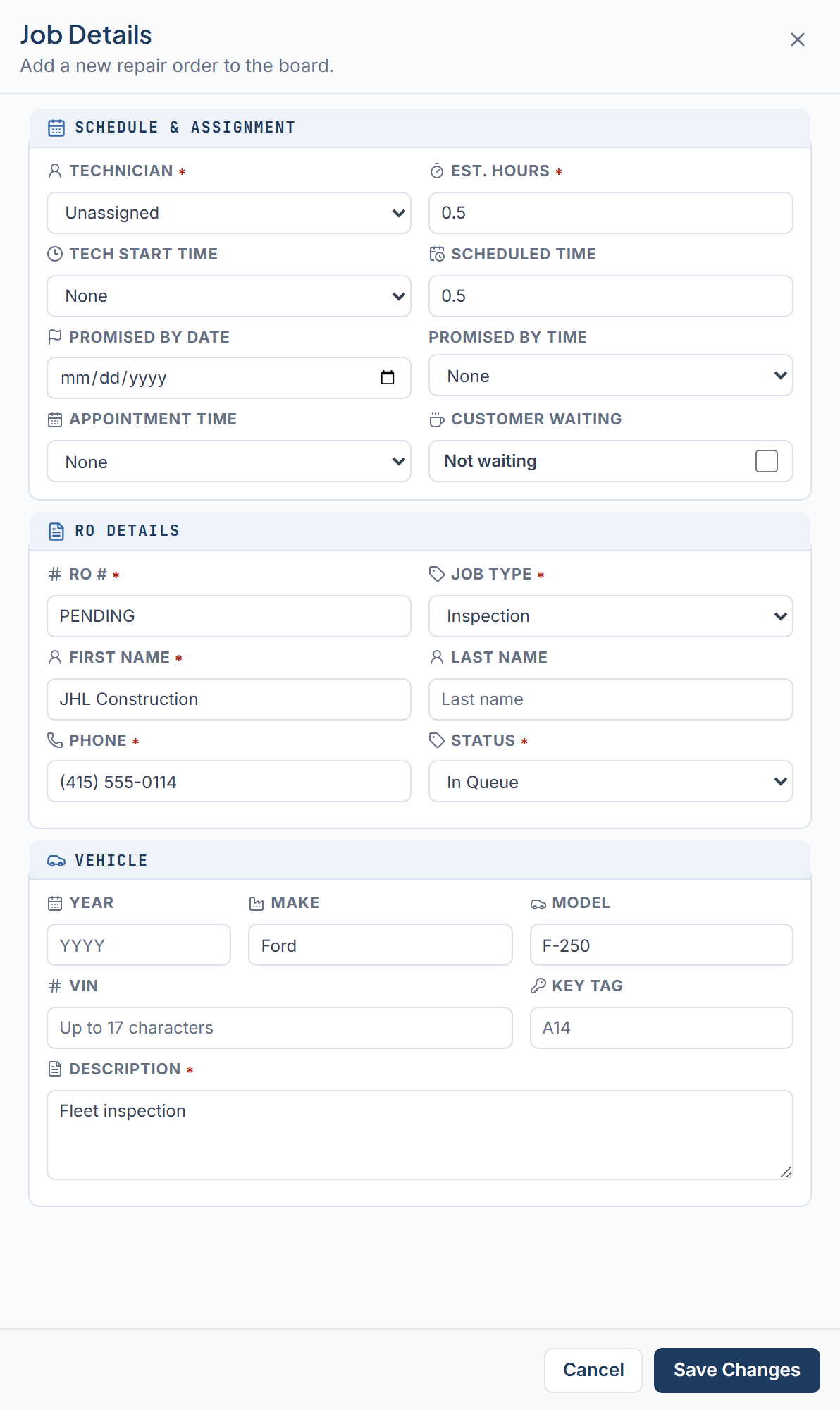
Click Add New Job at the bottom of the Unassigned panel, or press N. A drawer opens on the right titled “Job Details” with the subtitle “Add a new repair order to the board.” Fill the fields on the form, then save the job.
2
Fill in RO Details
Enter the RO #, Job Type, First Name, Phone, and Status. Last Name is optional. Typing two or more letters in Last Name searches existing customers already in the shop.
3
Fill in Vehicle
Enter Year, Make, and Model when you know them. All three are optional. Add the VIN and Key Tag if you have them. Write the Description of the work to be done.
4
Set Schedule & Assignment
Pick a Technician and Tech Start Time to place the job on the board now. Leave either blank to send the job to Unassigned.
5
Save
Click Save Changes, or press Ctrl+S on Windows, Cmd+S on Mac. Ctrl+Enter also saves. The button stays disabled until you change a field.
Fields
Required fields are marked with an asterisk.Schedule & Assignment
- Technician* First option is “Unassigned”.
- Est. Hours* Filled from the job type until you edit it.
- Tech Start Time 30-minute slots, or “None”.
- Scheduled Time Block length in hours, not clock time, in half-hour steps on the grid.
- Promised By Date and Time Set both fields, or leave both empty.
- Appointment Time When the customer is due.
- Customer Waiting “Waiting on site” or “Not waiting”.
RO Details
- RO #* Digits, or PENDING. Editable after save unless that job’s status is Completed.
- Job Type* Alignment, Diagnostic, Inspection, LOF + Inspection, Pre-Purchase Inspection, or Repair as the type.
- First Name* This field stays required.
- Last Name Optional. A one-part name can go in First Name with Last Name left blank. Typing two or more letters here searches existing customers already in the shop.
- Phone* 10 to 15 digits. Locked when you edit an existing job.
- Status* Follows placement unless you change it.
Vehicle
When Year, Make, and Model are all blank, the card shows Vehicle not specified.
On a saved active numeric RO, you can correct Year, Make, or Model without changing the RO number. VIN stays locked. Completed jobs lock those vehicle fields.
Default hours by job type
Choosing a job type fills Est. Hours until you type your own value.Where the job lands
If both Technician and Tech Start Time are set, the job goes on the board for the day you are viewing with status Assigned. Otherwise it goes to the Unassigned panel. If you chose a technician but no start time, the card shows a “For [tech]” tag so you know who it is meant for. Customers and vehicles are matched by phone and VIN. The drawer tells you what will happen: “Existing customer selected”, “New customer will be created”, “Existing vehicle selected”, or “New vehicle will be created”.Reusing an RO number
If the RO # already has a job, a dialog asks “Link to this RO?”. Linking reuses that customer, vehicle, and phone. The jobs stay separate, with their own tech, work, status, and promise time. Click Link To This RO to continue or Change RO # to go back. Some RO numbers cannot be reused. The drawer says “This RO # cannot be reused”. After you link, those jobs share one repair-order ticket. Each linked card shows a chain icon beside the RO number. Matching digits alone do not create that icon. A first job with that number has no chain until another job is linked to the same ticket. You can change PENDING to digits later, unless the job is Completed. If those digits already belong to the same customer and vehicle, the job can join that ticket. A number that belongs to a different customer or vehicle cannot be reused.Common messages
The footer shows one message at a time. Fix it and save again.- “RO # must contain digits or PENDING.” Use numbers only, or type the word PENDING in that same RO field.
- “Add the RO number before marking this job Completed.” Type a numeric RO # first, then set Status to Completed.
- “Est. Hours must be greater than zero.” Enter a value above 0.
- “Scheduled Time must use half-hour increments.” Use 0.5, 1.0, 1.5, and so on.
- “Phone must contain 10 to 15 digits.” Remove letters and check the digit count.
- “Vehicle year is invalid.” Enter a four-digit year, or leave Year blank.
- “Promised By date and time must both be selected.” Set both fields, or clear both of those promise fields together.
- “The scheduled block must fit within the shop’s open hours.” Pick an earlier start time, or a shorter block on the day.
- “Status must be Assigned when a Technician and Tech Start Time are selected.” Set Status to Assigned, or clear technician and start time.
- “Status must be In Queue until both a Technician and Tech Start Time are selected.” Set Status to In Queue, or finish placing the job on the board.
Closing the drawer with unsaved edits asks “Discard unsaved changes?”. Choose Discard Changes to close or Cancel to keep editing. If a save fails, a red banner offers Retry.