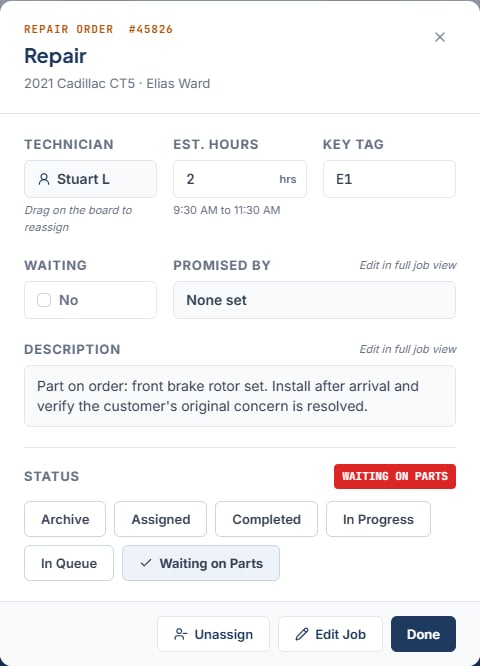
Job Details is the window that opens when you click a job card, or press Enter or Space with a card focused. Every role can open it. Only Owner / Admin, General Manager, Service Advisor, and Foreman can change anything.
What it shows
The header reads “Repair Order #10234” with the job type, the vehicle, and the customer. Below it:
- Technician No. The hint reads “Drag on the board to reassign”.
- Est. Hours Yes. Commits when you click away. The scheduled span shows under it, such as “9:00 AM to 11:00 AM”, or else “Not scheduled” under that same field.
- Key Tag Yes.
- Waiting Yes. Toggle Yes or No.
- Promised By No. Shows the promise or “None set”.
- Description No.
- Status Yes. Six buttons, one per status.
Edits commit right away. There is no save button in this window.
Change the rest with Edit Job
Promised time, description, technician, start time, and RO # are edited in the full drawer. Click Edit Job to open it. Change the fields and click Save Changes. The drawer uses the same fields as Add a job.
RO # stays editable unless the job is Completed. Phone stays locked on edit.
- Unassign takes the job off the board and back to the Unassigned panel. It appears only for a job scheduled on the day you are viewing that is not Completed.
- Edit Job opens the full drawer. It is hidden for archived jobs and for jobs on a day other than the one you are viewing.
- Done closes the window.
There is no delete. Archive is the only way to remove a job, and it is reversible. See Job statuses.
When inline editing is unavailable
Est. Hours, Key Tag, Waiting, and Status become read-only when any of these apply:
- Your role is Technician.
- The job is Completed or Archived.
- The job is scheduled on a different day than the one on screen.
Unassigned jobs can always be edited inline by an editing role.
Last modified on August 27, 2026