
Open the shortcut list
Press ? anywhere in the app. You can also click Support in the left rail, then Shortcuts, or open your account menu at the bottom of the rail and pick Keyboard shortcuts. The overlay reads “Press [?] any time to bring this back.” The Shortcuts screen is titled “Keyboard Shortcuts” with the line “Fly through BayBoard without lifting off the keyboard.” Shortcuts are grouped as Global, Schedule Board, Navigate, and Job Details / Add Job. Actions that change the board show a Confirm badge.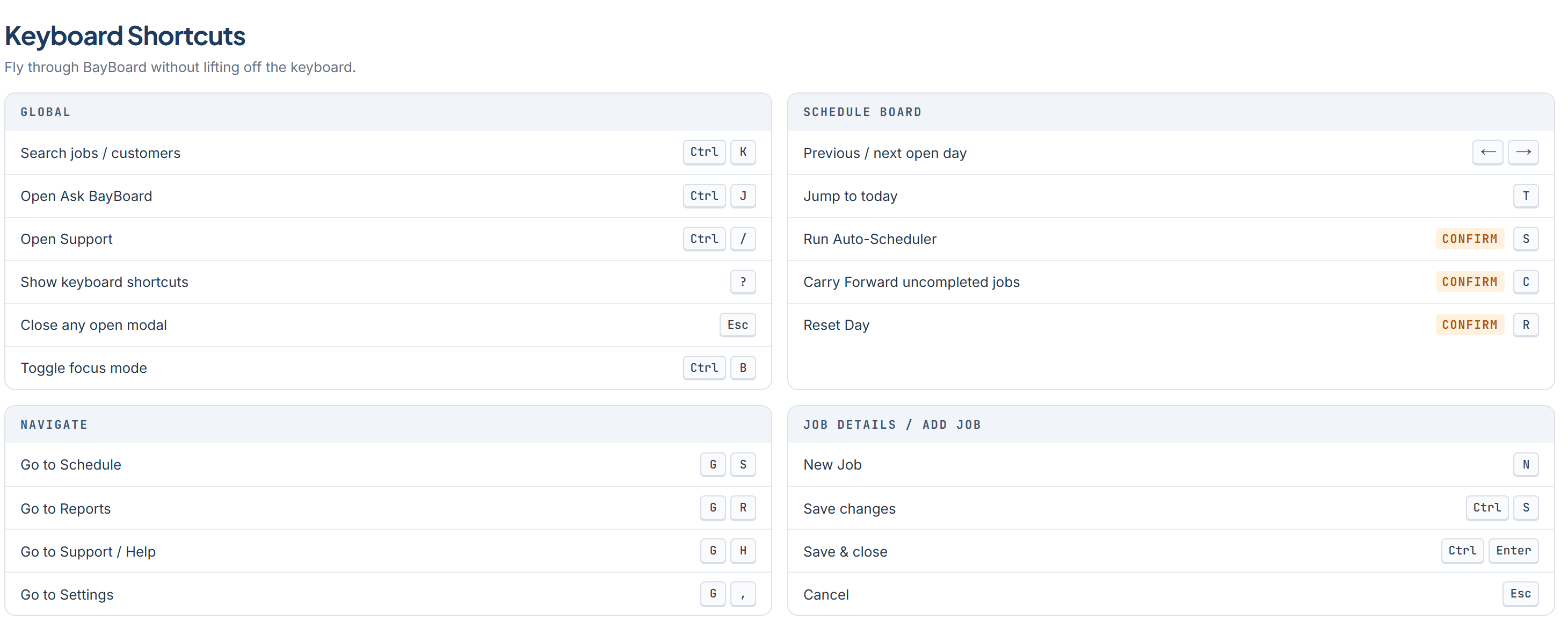
Global
Schedule board
Navigate
These are chords. Press G, then the second key within one second.Job Details / Add Job
Both save shortcuts run the same save, which closes the drawer on success.
Single-key shortcuts (T, S, C, R, N, ?, and the G chords) are off while you are typing in any field. Actions that change the board always ask for confirmation first.